FinanceManager



FinanceManager
FinanceManager is an open-source personal finance tracker built with Blazor WebAssembly and ASP.NET Core. It lets you manage all your accounts — cash, stocks, and bonds — in one place, with a rich analytics dashboard, AI-powered insights, and real-time market data.
Screenshots
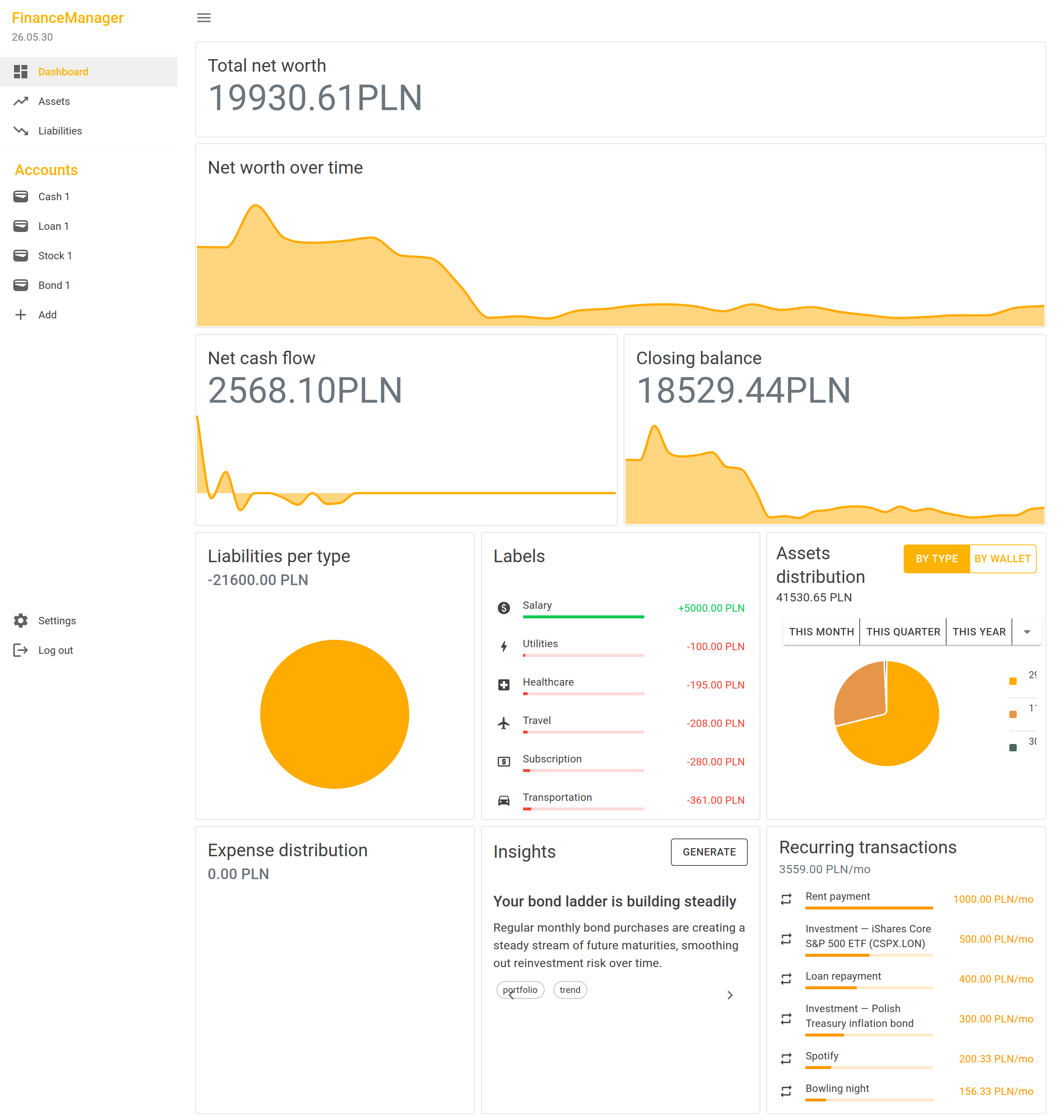
Dashboard
Get a complete picture of your finances at a glance — net worth, cash flow, asset allocation, and AI-generated insights all in one place.
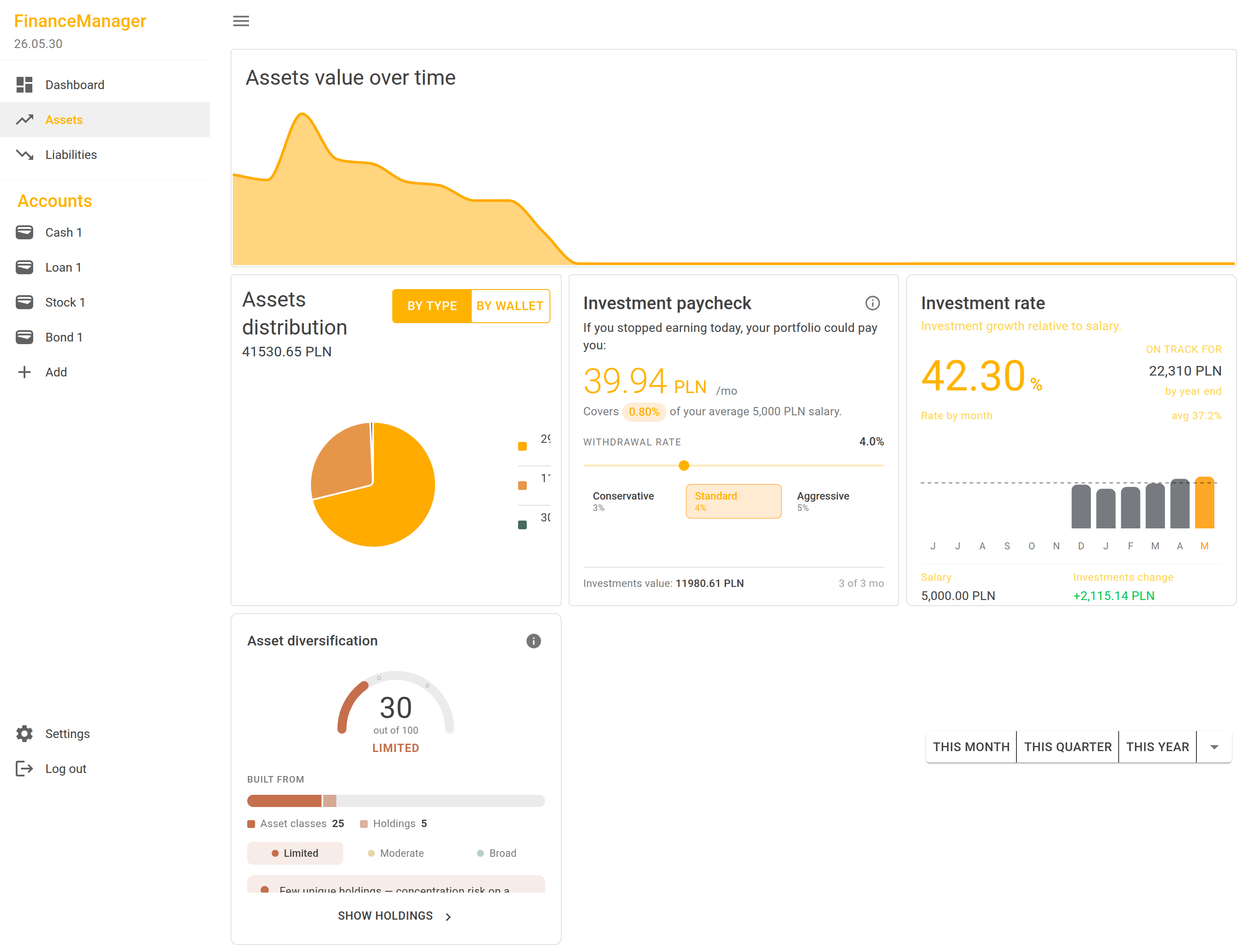
Assets
View and manage all your financial accounts across multiple asset classes.
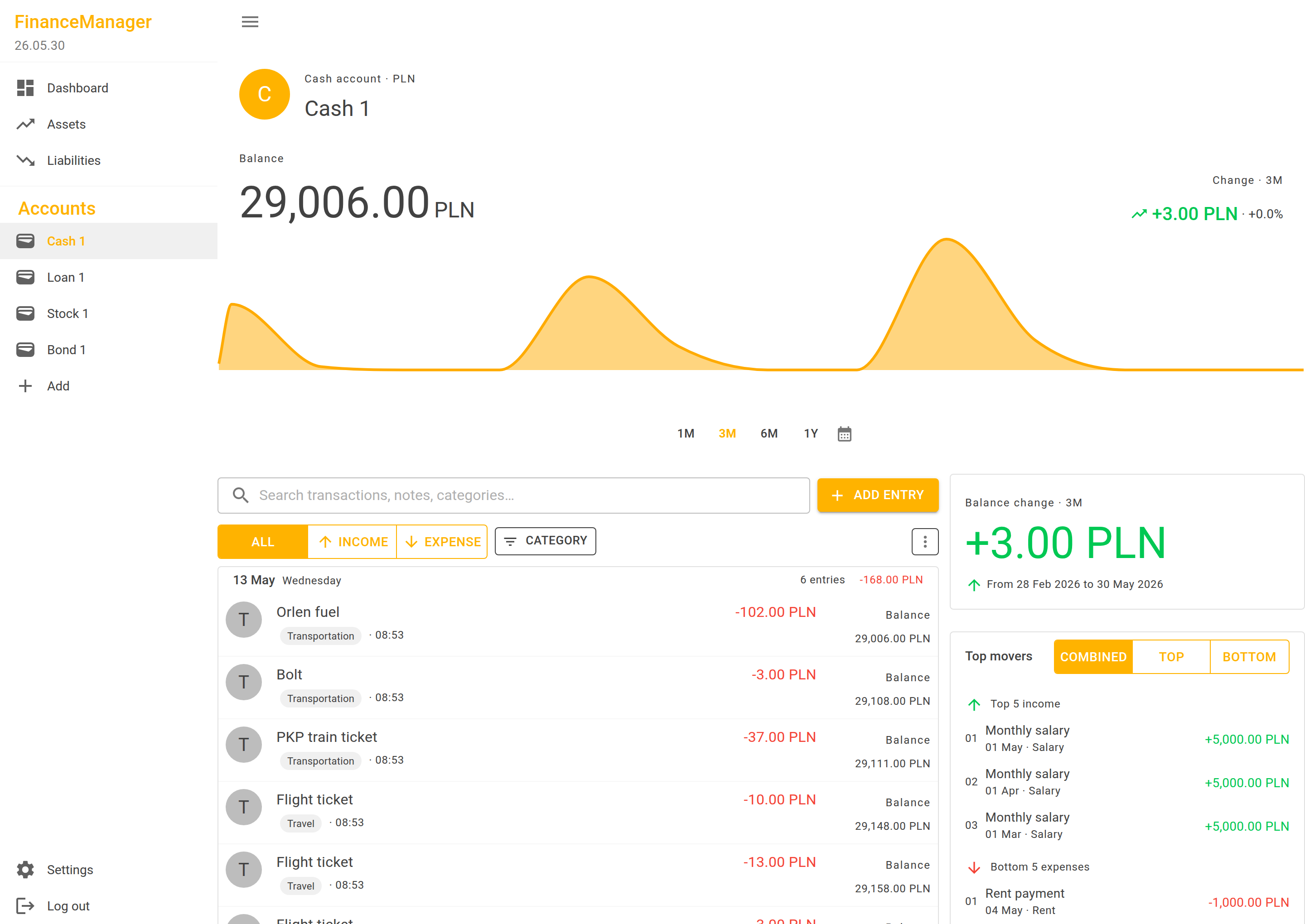
Account Details
Drill into individual accounts to inspect transactions, trends, and performance metrics.
Features
Dashboard
The dashboard aggregates data across all your accounts and presents it through a collection of interactive cards:
- Net Worth Overview — total assets minus liabilities, updated in real time
- Cash Flow — income vs. outflow analysis with inflow/outflow breakdown
- Asset Allocation — breakdown by account and by investment type (cash, stock, bond, property, crypto, commodities)
- Diversification Gauge — visual proxy score showing how diversified your portfolio is
- Investment Rate & Paycheck Estimator — project passive income from your investment portfolio
- Expense Distribution — categorised spending breakdown
- Recurring Transaction Detector — automatically identifies repeating income or expense patterns
- Financial Insights (AI) — carousel of AI-generated observations and recommendations based on your data
- Time Series Charts — plot net worth, assets, liabilities, and investment types over any date range
Financial Accounts
Three account types are fully supported, each with dedicated views:
| Account type | What it tracks |
|---|---|
| Currency | Cash balances and everyday transactions |
| Stock | Equity holdings with live price updates |
| Bond | Fixed-income securities, including inflation-linked bonds |
Data Management
- CSV Import / Export — bring in transaction history from external sources; map custom CSV headers; resolve import conflicts
- Bulk stock price import — seed historical price data in one operation
- Multi-account import — import several accounts in a single workflow
Real-Time Market Data
- Live stock prices via the Alpha Vantage API
- Live currency exchange rates
- Prices cached in the database to minimise external API calls
AI-Powered Features
- Financial Insights — large-language-model analysis of your transaction history delivered as actionable cards
- Automatic account labelling — AI suggests category labels (Cash, Stock, Bond, Crypto, Loan, Real Estate, …) for new accounts
- Configurable provider chain with automatic fallback: OpenRouter → GitHub Models → Ollama / LM Studio (local)
User & Admin
- JWT-based authentication with registration and login
- Role-based admin panel for managing users, AI provider configuration, stock catalogue, and bond data
Tech Stack
| Layer | Technology |
|---|---|
| Frontend | Blazor WebAssembly, MudBlazor (Material Design), ApexCharts.js |
| Backend | ASP.NET Core 10, SignalR, Entity Framework Core |
| Database | PostgreSQL (SQL Server also supported) |
| AI / LLM | OpenRouter, GitHub Models, Ollama, LM Studio |
| Market data | Alpha Vantage API |
| Observability | OpenTelemetry (OTLP export) |
| Local orchestration | .NET Aspire |
| Testing | xUnit, Moq, WebApplicationFactory, Coverlet |
The solution follows a layered modular monolith architecture:
Blazor component → typed HttpClient → API controller → application service → domain service → repository
Key design decisions worth noting for reviewers:
- Domain layer has zero infrastructure dependencies — no EF Core or ASP.NET references inside
FinanceManager.Domain - Typed HTTP clients encapsulate all API route details; components never call
HttpClientdirectly - Provider fallback chain for AI and stock prices keeps the app functional when any single external service is unavailable
- Background services + channels handle async jobs (insight generation, label assignment, CSV import) without blocking the request pipeline
- SignalR pushes real-time progress updates to the browser during long-running imports
Getting Started
Prerequisites
- .NET 10 SDK
- PostgreSQL or SQL Server
- (Optional) .NET Aspire workload for one-command local orchestration
Run with Aspire (recommended)
dotnet run --project code/AppHost
This starts a PostgreSQL container and the API automatically.
Run manually
# Restore and build
dotnet restore ./code
dotnet build ./code/FinanceManager.slnx

# Apply database migrations
dotnet ef database update -s code/FinanceManager.Api/FinanceManager.Api.csproj

# Start the API (also serves the Blazor WASM client)
dotnet run --project code/FinanceManager.Api
Then open https://localhost:5001 in your browser.
For production backup, restore, and rollback steps on Supabase, see RUNBOOK.md.
Run tests
# All tests
dotnet test ./code/FinanceManager.slnx

# Unit tests only
dotnet test ./code/FinanceManager.Tests.Unit/FinanceManager.Tests.Unit.csproj

# Integration tests (uses in-memory DB)
UseInMemoryDatabase=true dotnet test ./code/FinanceManager.Tests.Integration/FinanceManager.Tests.Integration.csproj
External API keys (optional)
Supply these via environment variables or .NET User Secrets — never commit them:
| Variable | Service |
|---|---|
AlphaVantage__ApiKey |
Live stock prices |
OpenRouter__ApiKey |
OpenRouter LLM |
GitHubModels__Token |
GitHub Models LLM |